

Organizing a product launch, a fashion show, or a gala dinner means coordinating precise details while creating an experience that feels effortless to guests. When invitations, responses, seating, and arrivals are managed in separate tools, maintaining that standard becomes harder.
Event management software can bring these activities into one workspace, helping teams reduce repetitive work, keep information consistent, and deliver a more considered welcome. Its value depends on how well it supports your event format, your team, and the experience you want to create.
Here are nine key benefits to consider when evaluating an event management platform in 2026. For a practical view of how invitations, RSVPs, tickets, seating, and check-in connect, explore our guide to creating a seamless event guest journey.
1. Centralized Planning and Collaboration
1. Centralized Planning and Collaboration
When several colleagues or external teams contribute to an event, the challenge is keeping their work aligned. A confirmation recorded in one spreadsheet may never reach the person assigning seats; a guest update shared by email may be missed by reception staff.
A shared event workspace gives the team a common reference for guest details, RSVP statuses, seating assignments, and communications. With Magnetiq’s attendee management tools, colleagues can contribute to the same guest list, with roles and permissions appropriate to their responsibilities.
The benefit is clearer coordination: less time reconciling separate lists and more confidence that accepted changes are available to the people who need them. Establish who maintains guest information, who approves changes, and who manages exceptions before the event.
2. Time and Stress Saving
Much of the pressure in event preparation comes from repeating small administrative tasks: entering responses, checking who still needs a reminder, finding the latest guest list, or passing seating changes to another colleague.
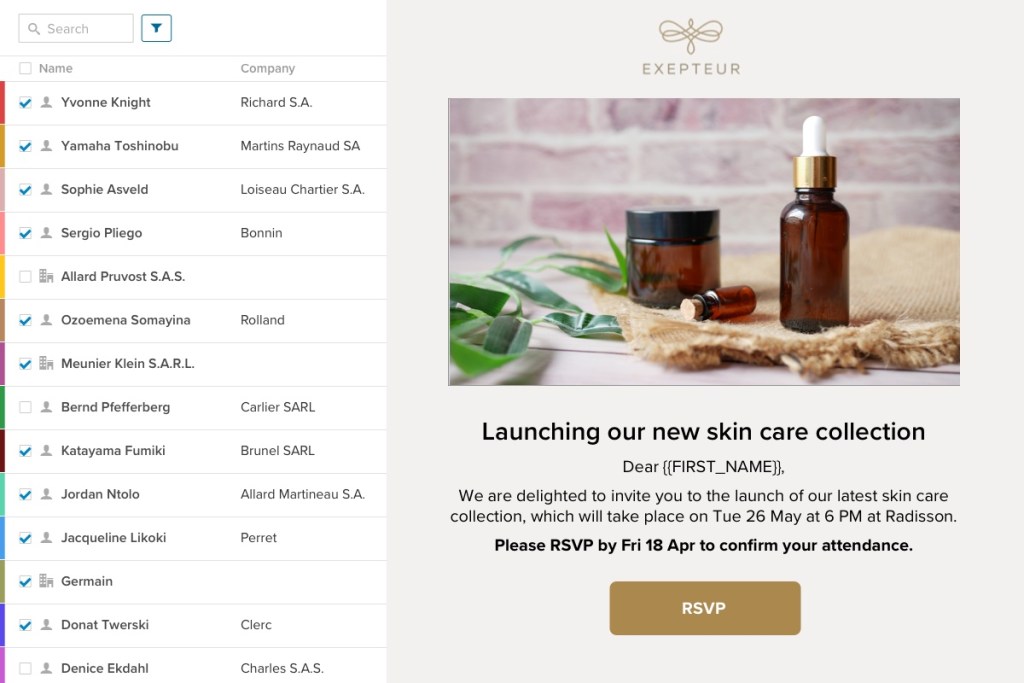
Keeping these activities connected can reduce that repetition. Magnetiq’s invitations and RSVP tools record guest responses in the attendee list, while its event email campaigns let teams prepare personalized messages for selected recipients. You can follow up with guests who have not replied without rebuilding the audience in another tool.
The time saved creates room for the work that requires judgment: reviewing guest requests, refining the welcome, and preparing staff. For practical ways to simplify responses and organize follow-ups, read our guide to managing event RSVPs.
3. Better Guest Experience
A considered guest experience starts with clear communication. Guests should understand how to respond, where to find practical details, and what to present when they arrive. Consistent branding helps each interaction feel part of the same event.
Magnetiq’s event tickets and QR codes give guests a personal access credential they can keep on their smartphone. Tickets saved in Apple Wallet or Google Wallet are technically issued as Wallet passes; each platform has its own design options.
Our guide to Apple Wallet and Google Wallet event tickets explains those differences. For seated events, clear communication of seat and table assignments helps extend that attention through to the welcome on-site.
The benefit is a coherent experience in which digital convenience supports personal hospitality.
4. Smart Use of Resources On-Site
Reception teams work best when they can find the right guest record quickly and know how to handle exceptions. Digital check-in reduces the need to search through printed lists and manually pass arrival updates between colleagues.
Magnetiq’s event check-in app supports QR scanning and manual guest search. For seated events, its seating plan tools also make assignments available to staff welcoming guests.
At the Bologna Children’s Book Fair’s opening event, the published case study describes a list of approximately 3,000 participants and three stewards using the iPhone app for check-in. This illustrates a specific deployment, rather than a staffing formula for every event.
The practical benefit is more focused use of staff. Reception arrangements should reflect arrival peaks, entrances, guest expectations, and the assistance required.
5. Automation Where It Counts
Automation is most useful when it removes repeated administrative steps while leaving the team in control of the event’s rules.
With Magnetiq, organizers can configure RSVP deadlines, attendance limits, and waiting lists. They can also enable automatic ticket distribution after an RSVP confirmation or completed registration, so guests receive their access credentials without a separate campaign.
For multi-part events, attendee lists can synchronize between the main event and related sessions according to the chosen configuration. The team still decides admission rules, assigns seats, prepares reminders, and manages exceptions.
The benefit is a more consistent process with fewer manual handoffs. When evaluating a platform, check which actions are automatic, what triggers them, and which settings your team needs to review before going live.

6. Real-Time Control and Insights
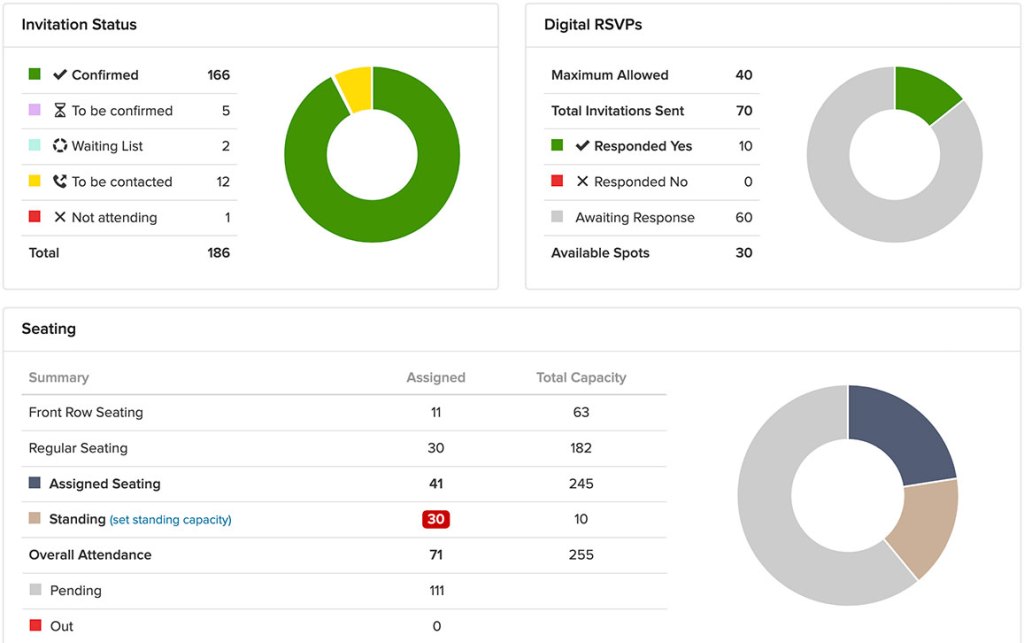
Event decisions become easier when the team can see the current situation. How many guests have confirmed? Which seats remain unassigned? Who has arrived?
Magnetiq’s event reporting tools provide visibility into RSVP status, seating progress, and recorded check-ins. When devices are connected, arrival updates synchronize across the team, supporting coordination between reception and colleagues inside the venue.
Connectivity matters. For offline check-in, the event must first be opened in the iOS app while connected so its data is downloaded. Arrivals can then be recorded locally, but offline devices do not share live updates with one another. Synchronization resumes when the connection returns.
Our guide to real-time guest list synchronization and offline check-in explains how to prepare for both conditions.
7. Post-Event Analysis and Reporting
A useful event review starts with questions you can answer from the data collected. How many confirmed guests attended? Which categories had more no-shows? What do the campaign statistics tell you about delivery, responses, and clicks?
Magnetiq’s reporting and analytics tools bring together RSVP information, recorded attendance, activity logs, and email campaign statistics. Filtered Excel exports give teams a basis for preparing internal reports and comparing events.
These records can help you refine invitation targeting, follow-up, and capacity planning. Their quality depends on consistent categories and complete check-in data, including synchronization of devices used offline.
Operational reporting also needs context: attendance and email interactions contribute to an event review, while conclusions about commercial value require the relevant objectives, costs, and business outcomes.
8. Consistency and Scalability Across Events
For teams running a calendar of events, consistency means carrying a well-designed process from one occasion to the next while allowing each event to retain its character.
Magnetiq’s contact management tools provide a shared database for ongoing relationships, while reusable email templates and duplicated event elements can reduce repeated setup work. Teams can preserve a recognizable visual identity and a familiar way of managing guests.
Reuse still needs review. Dates, venues, recipients, capacity, access rules, and seating arrangements should be checked for every event.
The benefit is a more repeatable operating model: easier onboarding for colleagues, less preparation from scratch, and consistent standards across departments or markets. When evaluating software, consider your annual event volume, team structure, and expected attendee numbers alongside the features you need.
9. Improved Security and Data Privacy
Centralizing guest information can give organizers clearer control over who accesses it and reduce the circulation of spreadsheets by email. Magnetiq’s attendee management tools support team roles and permissions; organizers should configure access around responsibilities and collect only the information needed for the event.
Access validation is another part of that control. A guest-linked QR code lets staff retrieve the associated record and check its arrival status. It does not, by itself, prevent a ticket from being forwarded or establish the identity of the person presenting it.
The Saint Laurent case study shows another approach: NFC invitations paired with individual guests and checked by Security, while PR staff use the same app for seating assistance. Connected devices share check-in status across entrances.
The benefit comes from combining appropriate permissions, reliable records, and clear reception procedures.
Is Event Management Software Right for Your Team?
The strongest reason to adopt event management software is the improvement it can bring to your own workflow. If your team repeatedly reconciles guest lists, manually distributes tickets, or struggles to communicate changes to reception staff, a connected platform is worth evaluating.
Start with the tasks that create the most friction. Then assess whether the software supports your event format, branding, collaboration needs, connectivity conditions, and reporting requirements.
For a practical framework connecting these activities, explore our event guest journey guide.
Request a Magnetiq demo to discuss your next event and review how guest lists, invitations, digital tickets, seating, and check-in could work together for your team.