
During Paris Fashion Week, Saint Laurent presented its Women SS26 show, where attention to detail extended beyond the runway to the way guests were welcomed.
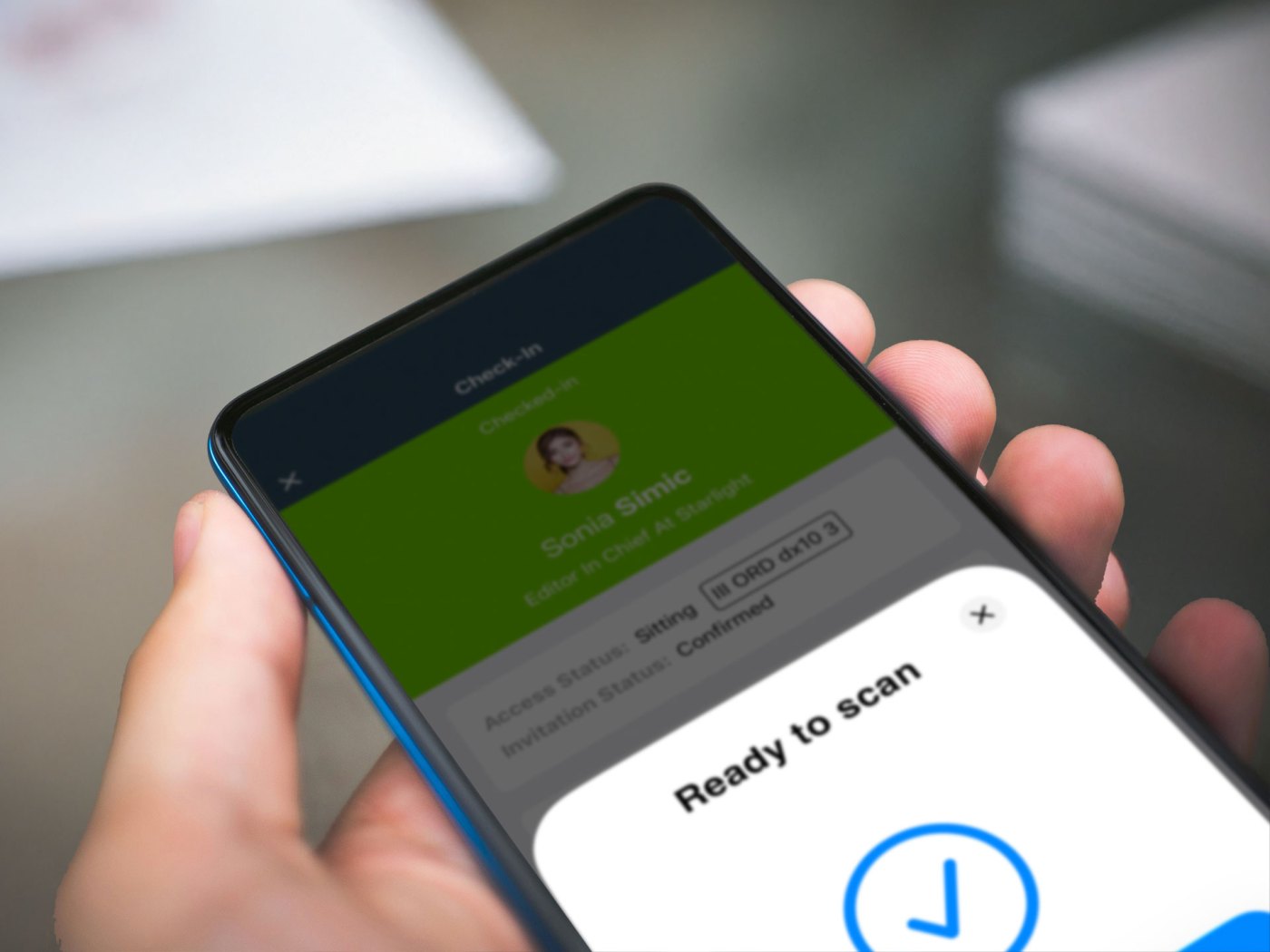
For the first time, the brand introduced Magnetiq’s NFC check-in, bringing digital access validation to its distinctive paper invitations. A simple tap of an iPhone connected the invitation to the guest’s record, combining discreet technology with the personal welcome expected at an exclusive fashion show.
Since that debut, Saint Laurent has regularly used Magnetiq’s NFC system to manage access security at its fashion shows. This case study explores how the approach brings together invitation preparation, guest access and on-site coordination.
A Seamless Tap-to-Check-In Experience
Saint Laurent was the first to adopt Magnetiq’s NFC Check-in module and now uses it regularly at its fashion shows. The feature enables staff to check in guests with a simple tap of an iPhone on the paper invitation they present at the entrance. There is no need to scan a QR code or search for a name — just a discreet, seamless gesture that feels natural and elegant.
This approach speeds up and elevates the welcoming process. The check-in moment becomes nearly invisible to guests, reinforcing the curated, high-touch atmosphere that marked its debut at the brand’s show at Place de Varsovie.
A New Layer of Security
At an exclusive fashion show, every detail of the welcome matters — including the checks guests barely notice. Invitations need to be validated, attempts to reuse them identified, and arrivals handled with the pace and discretion the occasion demands.
Saint Laurent uses Magnetiq’s NFC system to bring these requirements together. Each paper invitation is paired with a single guest, giving Security and PR teams a shared reference for guest access control while preserving the elegance of the invitation itself.
With a simple tap, the Magnetiq iOS app checks the invitation’s association and check-in status, alerting staff if it has already been used. With connected devices, that status is shared across entrances, helping teams identify repeat presentations wherever they occur.
The validation stays behind the scenes. Guests present their invitations, staff receive clear feedback, and security checks become part of the welcome — discreetly integrated into the atmosphere of Saint Laurent’s shows.
A Smart Setup Behind the Scenes
Bringing the NFC check-in experience to life has required a blend of thoughtful design and seamless technology. All this was achieved without compromising the event’s elegance.
1. Elegant Invitations with Embedded NFC
Saint Laurent’s paper invitation is an iconic object, enriched with personalized details handwritten by a calligrapher. The goal is to preserve its minimalist design while making the embedded NFC tag invisible. To achieve this, the Saint Laurent team produces invitations with the chip hidden between two glued layers of paper. The result is a secure, tech-enabled invitation that maintains the tactile luxury expected from a high-fashion runway show.

2. Smart Pairing with the Magnetiq iOS App
Using the Magnetiq iOS app in NFC Pairing Mode, the Saint Laurent PR team individually links each invitation to its assigned guest.
The attendee list displays the pairing status for each guest. It shows who still needs to be paired and who is already linked. Staff can filter the list accordingly and initiate the pairing process with just a tap.
Once ready, they simply tap the iPhone to the invitation. The app instantly writes the guest identity to the NFC tag and confirms the association.
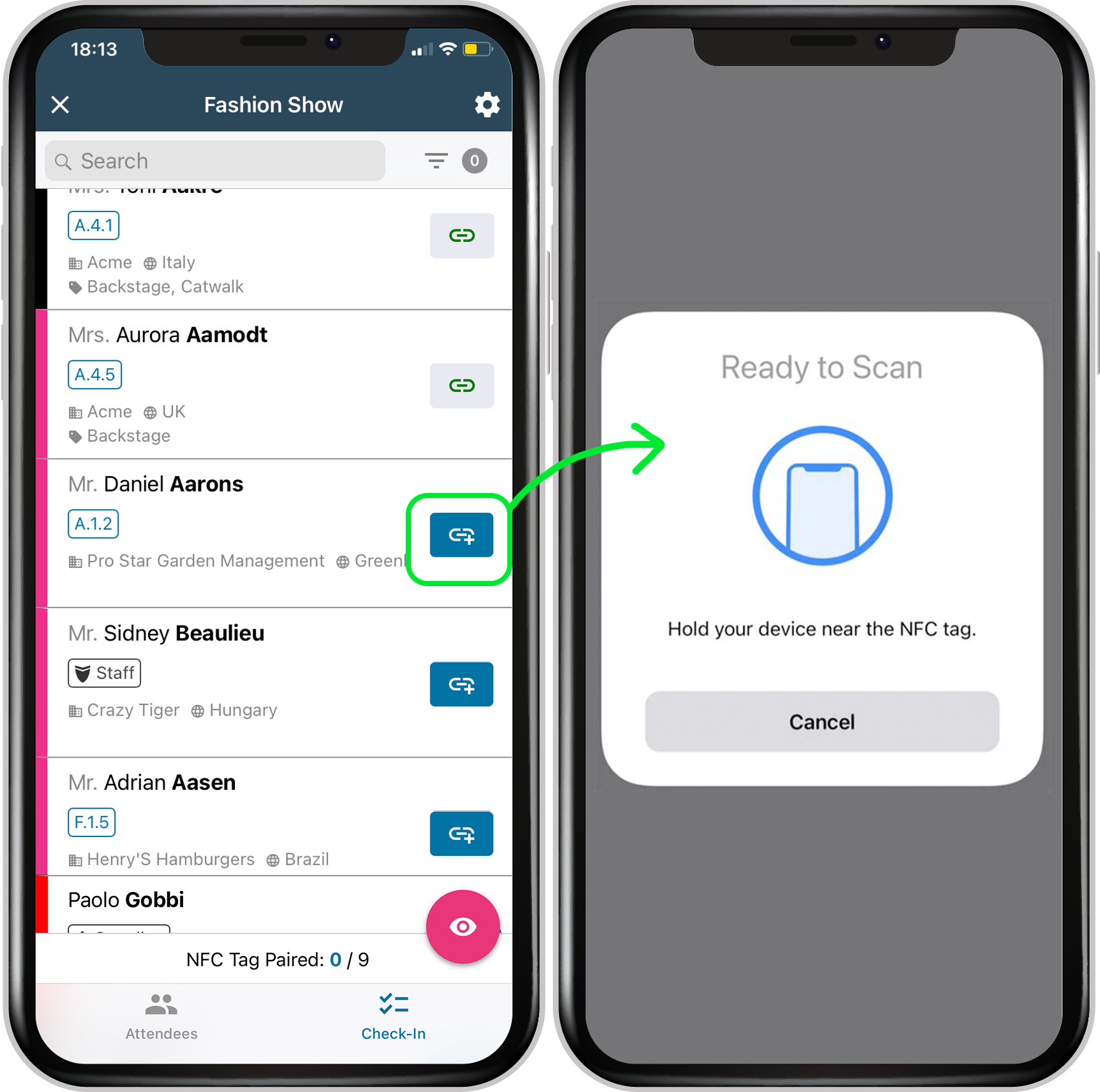
The system allows staff to link each NFC tag to a single guest identity at a time. If a tag already contains data, the system prompts the user to overwrite or cancel. This ensures complete control over every step. A special “read-only” mode also allows staff to scan and verify existing tags without modifying them.
Thanks to this intuitive and guided workflow, the team is able to prepare hundreds of secure invitations quickly and confidently. There is no extra hardware or technical barriers.
Fast and Reliable Check-In at the Gate
At Saint Laurent’s shows, the access control staff set the Magnetiq iOS app to Check-in Mode. They use it to validate guest entry: each guest presents their paper invitation, which the security team reads with a simple tap.
The app instantly shows one of three clear responses:
- ✅ Valid check-in — the app registers the guest successfully
- ⚠️ Already checked in — the tag has already been used
- ❌ Tag not assigned — the tag is not linked to any guest
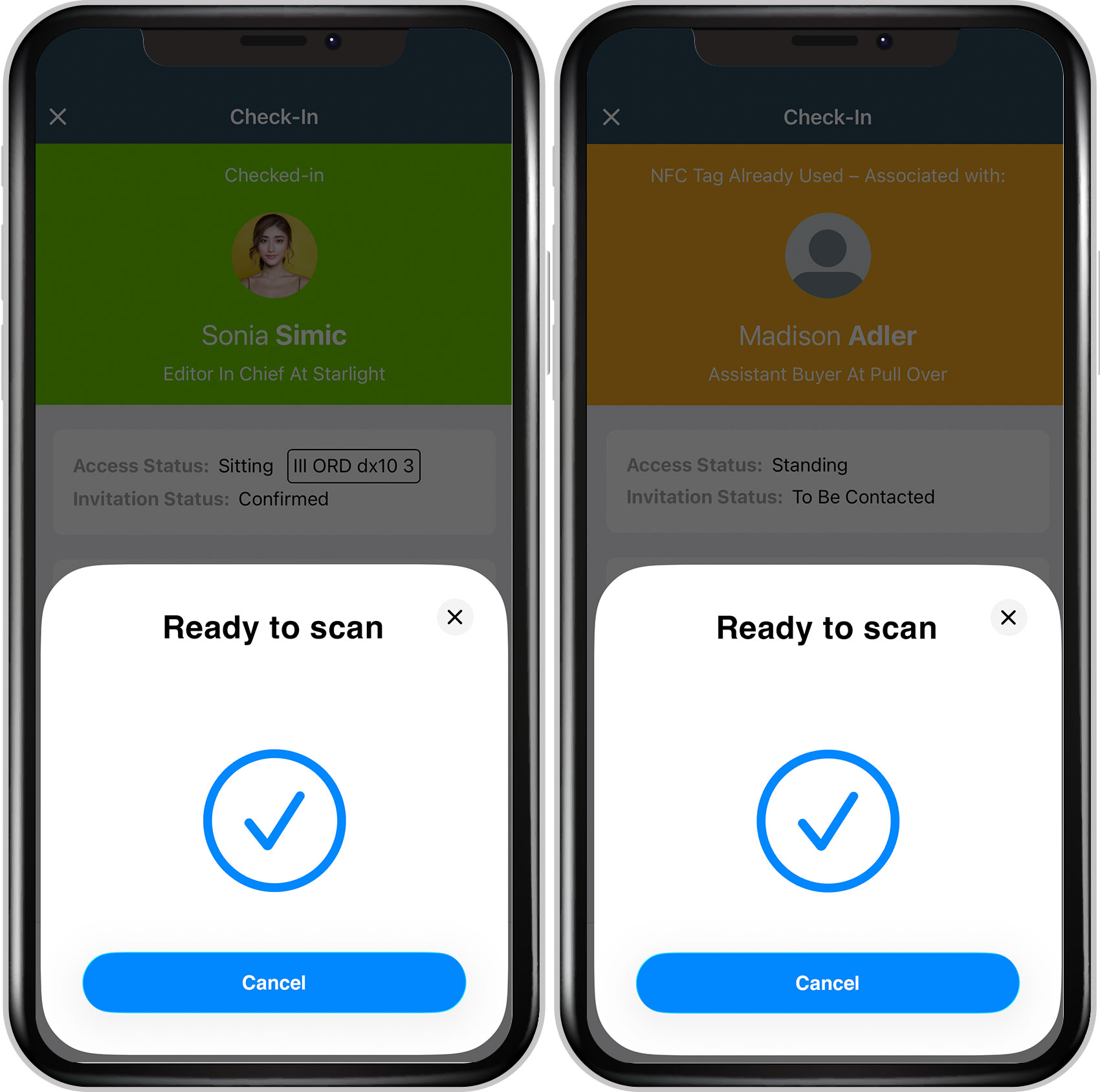
This immediate feedback helps both the security team and PR staff manage guest access smoothly, while maintaining control over the process. There is no need for QR scans, manual lookups, or secondary devices — just a single, discreet gesture that verifies each invitation’s association and check-in status.
Even under the live pressure of Paris Fashion Week, the system proved intuitive, stable, and frictionless. This allowed staff to deliver a smooth guest experience at one of the most high-profile shows of the season.
Real-Time Synchronization Across Devices
Magnetiq’s NFC check-in system works in real time. As long as the device has a stable connection, each check-in is instantly transmitted to the server and shared across all other devices being used at the event. This means that if a guest attempts to re-use the same invitation at a different access point, the system will immediately flag the issue — no matter where the second scan takes place.
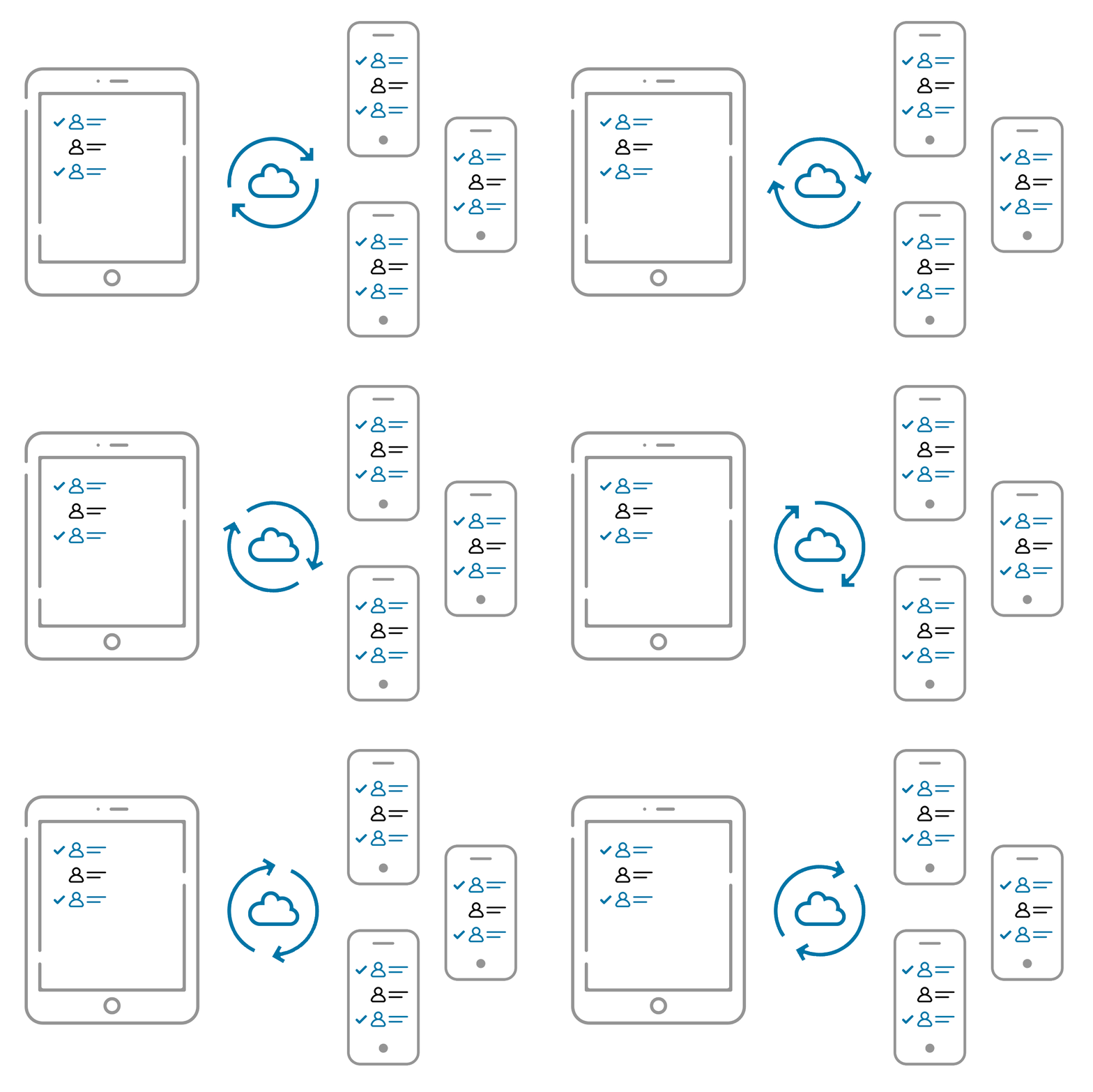
This real-time synchronization enhances both security and coordination. It allows staff to work from multiple entrances or zones while relying on a shared source of truth — ensuring accurate, up-to-date information at all times.
Reliable, Even with Poor or No Connectivity
Magnetiq’s NFC check-in system works reliably even when internet connectivity is weak or unavailable.
When a device cannot connect to the server, the app saves check-in data locally. As soon as the connection is restored, the data is automatically synced with the backend — ensuring complete and up-to-date attendance statistics.
The only limitation in offline mode is the lack of real-time sync between devices. This means that staff using different phones may temporarily see incomplete data. However, check-in can continue seamlessly on each device.
This makes NFC check-in a secure and dependable solution, even in remote or crowded venues.
One App, Multiple Teams, Seamless Coordination
With the Magnetiq iOS app, Security and PR teams work within the same system, synchronized when devices are connected. Each team uses it for a different purpose, without switching tools.
- Inside the venue, the PR team welcomes guests and helps them find their assigned seats. Using the visual seating plan directly in the app, staff can tap on a guest’s name to highlight their seat and accompany them personally — combining practical guidance with a warm, attentive welcome.
- At the entrance, the Security team uses Check-in Mode to validate invitations with a simple NFC tap. Each scan provides immediate feedback on the invitation’s check-in status, supporting fast, controlled guest access.
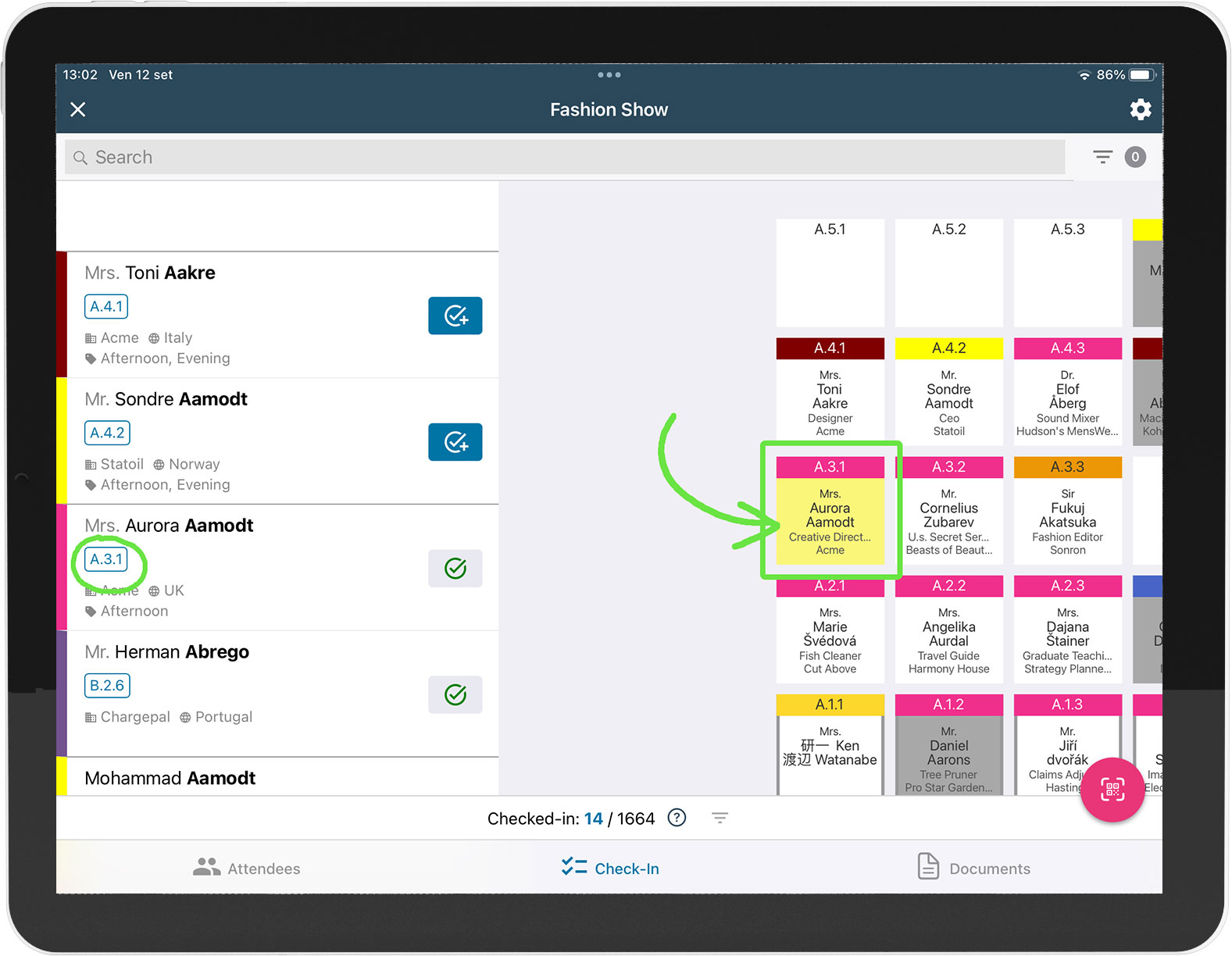
This shared system keeps arrival and seating connected, allowing each team to play its part in the same carefully coordinated welcome. For more on this stage, read our guide to communicating seating and table assignments. For the wider workflow, explore our guide to creating a connected event guest journey.
Looking Ahead
Saint Laurent’s successful use of Magnetiq NFC check-in marks a new chapter in luxury event management. By replacing traditional scanning with secure tap-to-check-in flows, the brand not only increased security and speed but delivered an experience that felt modern and exclusive — without adding friction for staff or guests.
The feedback from the event is already helping to inform future improvements. We look forward to expanding the use of NFC at other premium events in the months to come.
Interested in activating NFC check-in for your next event?
Reach out to our team to learn more about how the feature works and whether it’s right for your workspace.